YYCam Pro Plugin Guide: HP Bar PK
1. Key Features
1. Real-Time Interactive PK
Start a two-side battle during your livestream. Viewer support will update in real time.
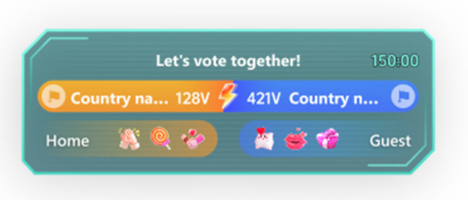
2. Dynamic HP Bar Display
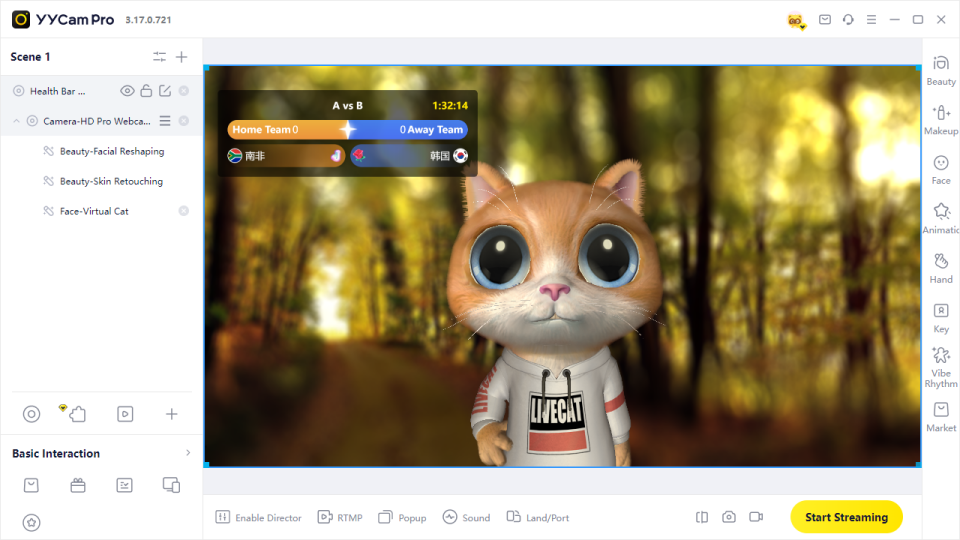
The PK progress is shown as a dynamic bar, allowing viewers to clearly see which side is leading.
3. Support by Gifts or Chat
Viewers can join the PK by:
- Sending specific chat messages
- Sending specific gifts
The rules are simple and easy for new viewers to understand.
4. Customizable Settings
Streamers can customize:
- Event title
- PK duration
- Battle teams
- Participation method
- Text color
- Background color
- Window transparency
5. Suitable for Sports and Event Streams
This plugin is especially useful for football, basketball, esports, and other competitive streams.
3. How to Use
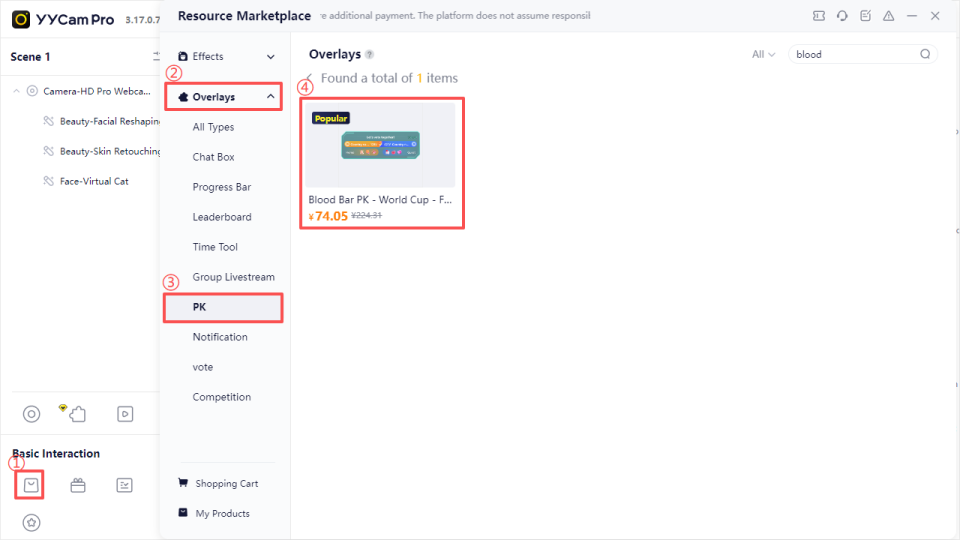
Step 1: Purchase the Plugin in Resource Marketplace
- Open YYCam Pro.
- Go to "Resource Marketplace".
- Select "Overlays".
- Choose "PK".
- Select your preferred HP Bar PK style.
- Click Purchase.If it is free, click Add directly.
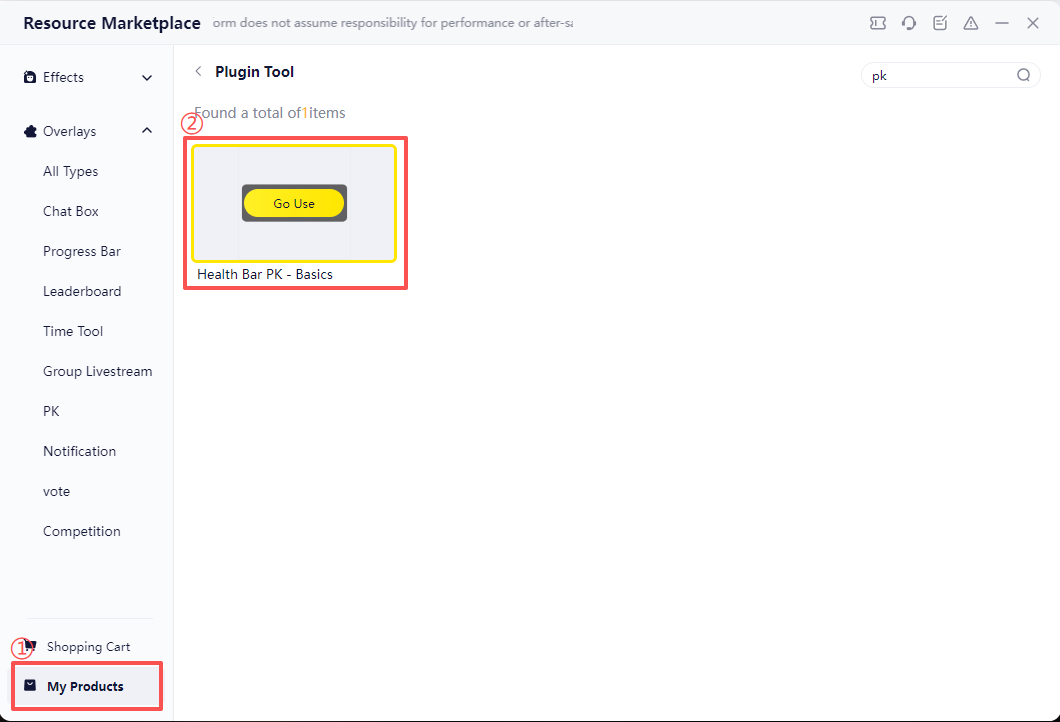
 Step 2: Start from My Products
- Go to "My Products".
- Find the purchased "HP Bar PK" plugin.
- Click "Use Now".
- Enter the plugin settings page.
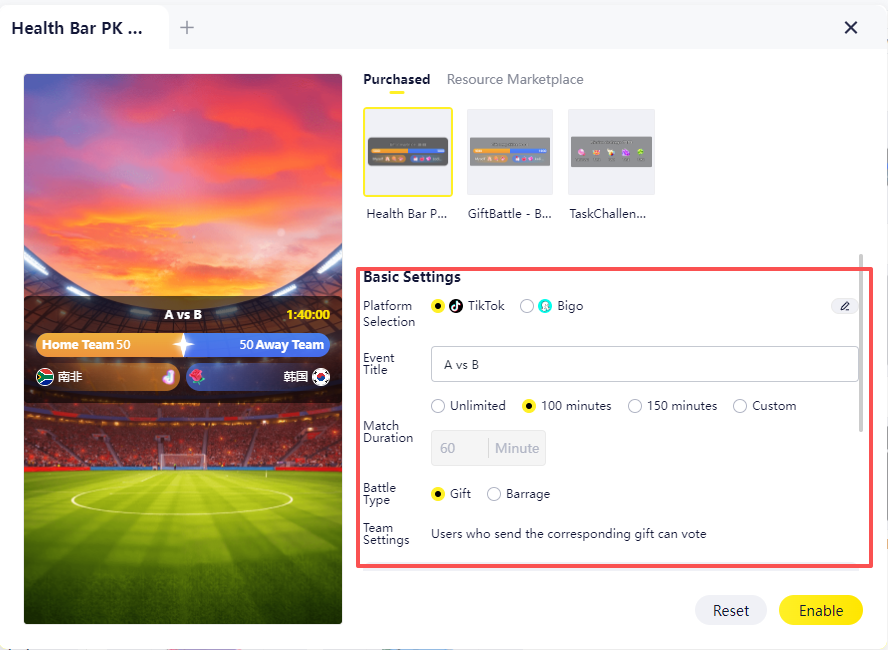
Step 3: Configure PK Information
Live Platform
Currently supported platforms include:
- TikTok
- Bigo
Event Title
The title will be displayed on the PK plugin.
Example: “Which team do you support?”
PK Duration
Set the duration of the PK.
- Minimum: 1 minute
- Maximum: Unlimited
PK Type
This decides how viewers participate.
Gift:Viewers send specified gifts to support a side. Multiple gifts can be configured. The scoring rules are shown on the settings page.
Chat:Viewers send option numbers, team names, or country names to support a side.
Team Settings
Select the two teams or sides for the PK.
Theme Settings
Customize the display style:
- Text color
- Background color
- Window transparency
Step 4: Start PK on the Live Screen
- Confirm all settings.
- Click "Enable".
- The HP Bar PK will appear on the live screen.
- Viewers can support their side through gifts or chat.
- The PK progress will update in real time.
4. Usage Tips
1. Configure and Test Before Going Live
Before starting your livestream, check:
- Whether the plugin displays correctly
- Whether the text is clear
- Whether the colors match your screen
- Whether the transparency is suitable
- Whether it blocks important content
2. Explain the Rules to Viewers
Before starting the PK, clearly explain how viewers can participate.
Example scripts:
- “Send 1 to support the left team, send 2 to support the right team.”
- “Send the specified gift to boost your favorite team.”
- “Type the team name in chat to support them.”
- Clear rules help viewers join faster.
3. Keep the Title Short
Recommended titles:
- Which team do you support?
- Who will win?
- Who wins tonight?
- Which side are you on?
4. Set Duration Based on Streaming Rhythm
| Use Case | Recommended Duration |
| Quick voting | 1–3 minutes |
| Pre-match prediction | 5–10 minutes |
| In-match interaction | 10+ minutes |
| Long-term team support | Unlimited For new streamers, it is recommended to start with 3–5 minutes. |
5. Place the Plugin Carefully
Recommended positions:
- Top of the screen
- Bottom of the screen
- Side area
Avoid blocking:
- Streamer’s face
- Match score
- Important match content
- Chat area
- Gift effects
- Platform information
5. FAQ
Q1: Can I change the skin during PK?
It is not recommended to change the skin after the PK starts. Please preview the style before starting.
Q2: How is viewer support counted?
The system counts support automatically based on the selected participation method.
- Gift mode: specified gifts add progress to the selected side.
- Chat mode: specified messages are counted for the selected side.
Please refer to the plugin settings page for detailed scoring rules.
Q3: What should viewers send in chat?
You can guide viewers to send:
- “1” to support the left side
- “2” to support the right side
- Team name or country name to support a side
It is recommended to repeat the rules during the livestream.
Q4: Will the result be shown after PK ends?
Yes. After the PK ends, the plugin will show the final result. The exact display depends on the selected style.
Q5: Why is the plugin not showing on the live screen?
Please check:
- Whether you clicked "Enable".
- Whether the correct platform is selected.
- Whether the plugin is covered by other windows or materials.
- Whether the position and layer order are correct.
- Restart the plugin from "My Products".
If the issue continues, please contact YYCam Pro support.
6. Summary
YYCam Pro “HP Bar PK” helps streamers create real-time battle interactions. Viewers can support a side through gifts or chat, and the result is displayed through a dynamic HP bar.
It is suitable for sports streams, team support, match prediction, and voting interactions. With proper settings, streamers can increase viewer engagement, discussion, and retention.